If you’re using social media outlets for your business, I bet that you are always on the hunt for the “magic formula” to creating the most engaging social media posts possible. As businesses, you want to capture the attention of your followers and get them to ‘like’, ‘tweet’, ‘pin’ and ‘share’ your post with everyone!
Sadly, there isn’t a “magic formula” of variables you need to have to ensure your post will be engaging. Each social media network operates a little differently, and every business has its own, unique customers with individual tastes and preferences.
One thing we can offer you though, are a couple of guidelines that can help you craft the best social media updates and posts possible for each social media network – Facebook, Twitter, Pinterest, and Google+. These basic tips will help you create more engaging posts and updates for your followers.
Facebook
Keep things positive.
Don’t be a Debbie Downer. Customers engage more with positive brands. Post a status that will help inspire and excite your followers.
Provide a link.
Include links to your website. Shorten your URL using bit.ly, which now allows you to edit the characters at the end of a link and gives you analytics on clicks. This will help your link stand out and increase click-throughs.
Include images.
Images can help you capture your customers’ attention and encourage them to share your content among their friends. It can be as simple as giving them a preview of a new product to entice them to come in to the store or visit your website.
Engage with users.
Simply posting a status isn’t enough. Part of what makes social media great is the instant two-way communication. Make sure you are engaging and building relationships with your fans through conversational dialogue when they comment on your posts.
Don’t forget to be mobile friendly.
Almost everyone uses their mobile phones now, for everything, so make sure the content you post can be seen on mobile devices.
Be available.
In today’s connected world, customers expect you to respond past the 8-5 workday. Be sure to post when you audience is most likely to engage, which might be during nonworking hours.
Twitter
Format.
Ask a question, give insights, and post facts and figures to capture your followers’ attention, and encourage a retweet.
Call to action.
Don’t be afraid to tell your followers what to do next. Be clear, and lead them to what the next step is with directions such as: “retweet this,” “share this,” or “use hashtag ‘x’.”
Mentions.
Use mentions to encourage influencers to engage with your business. This will help build your online creditability and online Klout.
Grammar.
Try to be as grammatically correct as you can. With 140 characters we know it’s sometimes a challenge to get your message across, but avoid abbreviations and use capital letters in the correct places.
Retweet.
Establish yourself as gatekeeper of great information and retweet relevant information to your followers. Also, don’t forget to thank people who retweet you!
Shorten URLs.
Bit.ly links generate more retweets than regular URLs. So don’t forget to shorten all URLs you tweet.
Pinterest
No Humans Faces
Images shared by brands without human faces are repined 23% more times.
Just a little background.
Try to keep your background under 40% of the entire image. When background is above that repins drop by 25-50%.
Multiple colors.
Keep your pins colorful! Pins with multiple dominate colors garner 3x more repins.
Light and colors.
By using a 50% color saturation on your images you can increase your repin rate by up to 4x.
Google+
Tag.
Tag brands and people that are relevant to your post. This allows for you post to get more exposure and increased engagement.
Use hashtags.
Hashtags help increase your audience size by allowing your content to be found easily. It’s a great way to not only meet people but for other people to find your post as well.
Use full size images.
Using bright, full sized images helps capture your viewers’ attention and increase the probability of +1’s.
Engage with users.
Just like with Facebook and Twitter, you have to take the time to reply to everyone who comments and shares your posts. You have to open the lines of communication so users keep coming back to your posts.
With all social media networks you must remember to always keep in mind what your followers want, and strive to post information that benefits them. Social media can be a great asset to every business, but you have to invest the time to do it right.
Online marketing has been growing more and more in popularity. This trend is very common among start-ups and small business owners that have minimal advertising budgets. Online marketing can be a scary venture for those who are inexperienced.
Where do I start?
How much should I pay for online advertising?
What websites / services should I use?
How do I get my message where my customers are?
These are just a few of the common questions business owners have when beginning online marketing. Grasping the full realm of the online marketing world is a process that can take years and is often ongoing due to its ever-changing nature. Getting started with online marketing is manageable, but there are a few tips you should remember when doing so.
1. You don’t accept the reality of time.
Setting up profiles on all of the various social media sites, building a website, and setting up and claiming your listings on all of the various online directory websites can be a daunting task, and now you are going to have to set aside time to effectively manage all of those accounts. It will take much more effort and time than you initially think to establish an online presence, build a following, monitor for negative & positive reviews, and keep your followers engaged.
2. You spread yourself too thin.
It is tempting to want to have your business listed and marketed on every single social media platform available, but the reality is that resources are limited, and if you spread yourself too thin across too many social media networks, you will end up with less than desirable results. Start with one or two that you think fit your target market, build your audience, perfect your engagement on those sites, and then start adding other networks, but make sure not to add more than you can handle with your resources.
3. You are not engaging your online audience.
You’ve gotten to the step where you’ve built a good base following, but you aren’t getting the results you want. The most common reason this happens is that you are not engaging your audience. You must always make sure to post content that is relevant to your business and products, but you do not want all of your content to be simple advertisement. Post content that your audience will find useful and valuable, so they want to comment, share and repost. Also, make sure to respond to each and every comment, question, tweet, or other social interaction that have been left on your pages. Show your audience that you care about what they have to say and that you are active online daily.
4. You don’t have an online marketing budget.
Although it can sometimes be a daunting task to determine where to spend money, how to spend it, and how much to spend online, spending a little bit of money can save you in the long run. If done smartly, investing a small amount of money in Facebook or Twitter ads can increase traffic to your website or physical location.
Marketing your business online can sometimes be a stressful and intimidating task, but if you avoid the most common mistakes outlined above, you should be more productive and feel much more confident in your efforts.
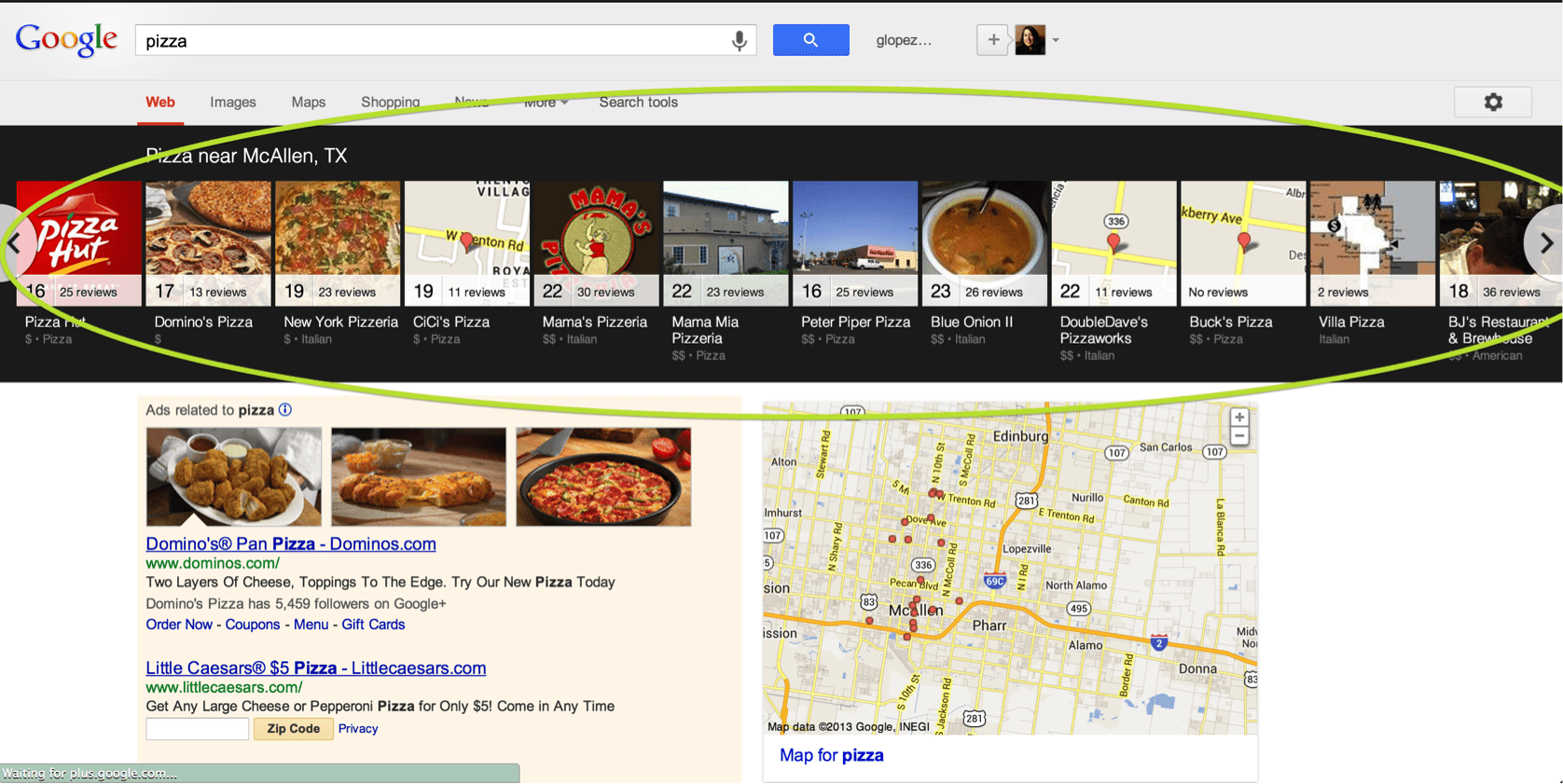
Google unveiled a new search engine result page (SERP) layout for small businesses in certain industries that will bring them front and center. This new local search layout allows for small businesses to be prominently displayed on the first page of the SERP when customers search for local businesses via their desktop computer.
This is a great change for small business. It will help your business become more competitive with national chains by giving you more visibility when a customer searches for your products/services. So, we thought we’d give you the basics about the changes and what this change might mean for your small business.
What business verticals does this affect?
Currently, this change affects restaurants, bars, hotels, and entertainment-focused businesses such as theaters, museums, and art galleries. If your business isn’t in these categories, it doesn’t mean this change isn’t coming to your industry soon, so keep a look out.
What does the new SERP look like?
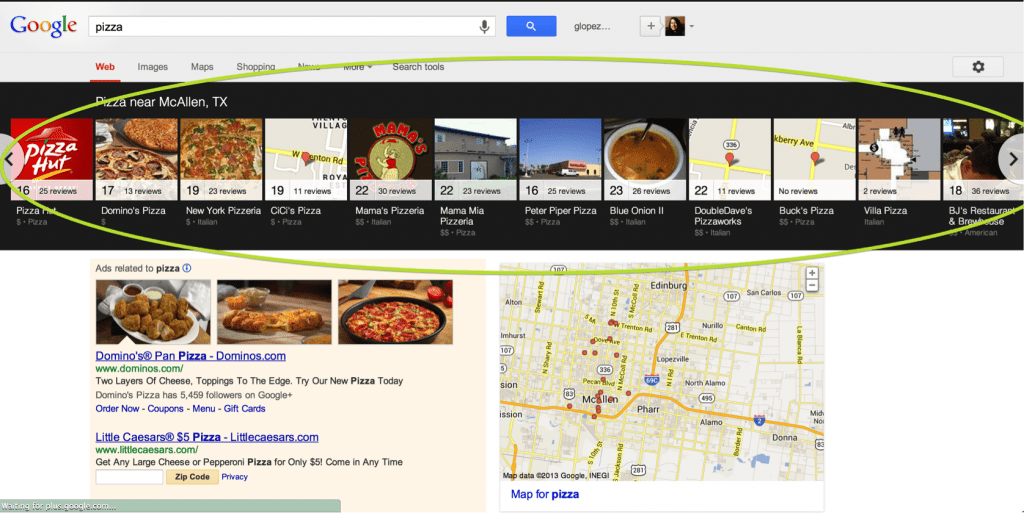
When a customer performs a search query in one of the supported categories, Google now displays results in a horizontal “carousel” across the top of the page. Businesses logos and/or images are displayed within the “carousel” and display the business’ name, photos, rating and review information.
How is my Google Search position determined?
There really isn’t a true way to determine how Google ranks organic listings, but more than likely the following factors play a key role in how well your business will rank in the search listing:
- Verified, complete and accurate business information
- Localized keywords and search-optimized content
- Quality and number of reviews
- Engaging and appealing images and videos
What are the new features?
There are several key features that businesses must be aware of in order to ensure they are shown in the best light possible. We’ll cover five key features and how you can optimize your business’ organic search listing:
1. Results are tied to your Google+ Local Map Listing.
This is a great thing for your business; all you have to do is ensure that you have set up your free Google+ Local listing. So, every time a customer searches for your category plus a geographic keyword (zip code, or city) your business information will show.
2. Feature a single image.
These images will be pulled in from your businesses Google+ Local page, so it is important that your page contains relevant images that can be pulled into your business’ carousel listing. You want these photos to be enticing, and eye-catching. Also, keep in mind that Google determines which image will be used, so ensure all your images represent your business’ services and products.
3. Rating number appears on carousel if you have one.
This is important because customers get a quick view of what others are saying about you. This means you need to ensure you are monitoring what your customers are saying online, especially on Google+ Local. You need to be proactive about responding to negative reviews and ask your happy customers to leave you positive reviews to help boost your overall rating and increase the number of reviews.
4. Clicks on your carousel result turn into a branded search.
Now when a customer clicks on the business link from the carousel results, it changes the SERP below the carousel to reflect those results.
This feature makes your business online presence more important than ever! Consumers can now easily go from searching generic local keywords to a specific search for your business in just one click. This means you need to be sure that correct and accurate information appears when you search for your business. Also, make sure you’ve claimed your social media pages, are creating content, and monitoring your online reputation on sites like Yelp, Foursquare and Citysearch, whose reviews often show up in search results.
You can also make note when you click on your listing in the carousel what search term is automatically created for your business, and incorporate this long-tail keyword into your search engine optimization strategy.
5. The branded search can display ads in addition to organic results.
With this update the branded search will not only display organic results, but also will feature up to two paid search ads directly under the carousel listing.
These changes are a great opportunity for local business to get online exposure. Just ensure your business it ready for it!
When you’re searching for a local service, what steps do you take? Do you ask your friends? Drive around town looking for a place of service? Search the web? A recent study estimates that roughly 20% of desktop search and a whopping 40%-50% of mobile search have local intent. What should these numbers mean to small business owners? This means that if your business’ online listings are not up-to-date and accurate, the probability of a potential customer finding your business starts to decrease.
70% of the small businesses surveyed acknowledge that they don’t have the time to manage all their online listings on all of the sites that consumers use. In addition, only 23% have a good sense of how having accurate and up-to-date online listings help drive traffic to their business. Not having a presence online is comparable to your business not having signage at your physical location. So, how do you think people will be able to find your business?
Online listings aren’t just crucial for their ability to help potential customers find your physical location, but they can prove to be a great source of business information for your potential customer. Many directories now give you the ability to list your business’ menu, products, services and payment method. This gives customers a glimpse into your business and what it has to offer.
As a small business it’s sometimes hard to keep track of all the listing sites online. With hundreds of online directories, physically maintaining all entries can be a daunting task, but there are a few simple steps you can take to ensure your listing accurately reflects the most vital information of your business- name, address, and phone number.
First, assess how people are finding your business. If you have a website, make sure you have analytics, so you can track exactly where people are coming from. If your business does not have a website, ask customers when they come in store how they found your business. Then, get a website!
Next, review the top 5 to 10 sources that are driving people to your business. How is your business listed? Are there reviews? What are people saying about your business? Take the time to review each source and make updates where necessary.
Lastly, decide who is going to continuously monitor and update your business’ listings. Make sure the person who is going to be in charge of this task is well equipped with the knowledge of your products and services.
Maintaining and managing your business’ online presence is a never-ending task. Amplify offers a variety of services to help manage and monitor your online presence. As a Certified Partner of Yext, we are able seamlessly mange your business’ online listings across 45+ directory sites.
Regardless of how you choose to manage your online listings (on your own or with an agency), by keeping your business’ listings accurate across directories you can help increase your business visibility and marketing exposure.
Call us for more information (888) 482-1313.

When starting your own business branding isn’t the first thing on your mind. Although it might seem like something trivial at the beginning, establishing your brand ‘voice’ is an essential part of creating a memorable image and building loyalty among your customers. Your brand is how the public will identify your company, so you have to ensure it is as recognizable and memorable as possible.
Branding is difficult because you can’t afford to make any mistakes. One slight misstep might negatively affect your business for years to come. That’s why it is important to establish your brand from the start and continuously work hard at maintaining it.
This being said, I want to talk about 5 of the most common branding errors that small business owners have to deal with.
1. Being a Follower
One of the worst mistakes you can make as a small business is trying to similar to other business around you, whether that be a larger company or a local competitor. Consumers value a company’s individuality, so your company’s public image should be as unique as possible to ensure it doesn’t look like you are trying to copy someone else.
2. Wrong Name
A company’s name is everything. You want to ensure that you customers can easy talk about your business with out the name interrupting the flow of a casual conversation or being difficult to pronounce.
Furthermore, make sure that the name you pick for your business is unique and not easy to confuse with another business or worse, a competitor.
3. Be Committed
Ensure everyone at the company is onboard with the branding strategy for the company. You don’t want your sales team projecting an entirely different brand image then what the company is trying to establish. This means committing to a single brand identity and carefully cultivating it both within the company and with your customers.
4. Hold Yourself Accountable
There is nothing worse to a consumer then a broken promise. Don’t promise something you can’t deliver, the reputation of your company is on the line. Set realistic expectations so that your customers are never disappointed in your business or your brand.
5. Know Who You Want As a Customer
Don’t try to please everyone! Consumers are diverse and change their tastes quickly, so don’t base your brand around a trend that might be gone next week. The image you create for you business should be durable and able to stand the test of time.
Overall, the most important aspect is that you protect your brand. Ensure that every decision is made with your brand image and positioning in mind. Just because you’re a small business doesn’t mean you can leave your brand up to chance.
We know that it might seem trivial to go through this process, but once you are an established business it is much harder to shape who you are and what you are all about. So get it done from the beginning so you have a strong foundation for your business to grow and prosper.
Has this motivated you to get your businesses branding done, but don’t know where to start? We’d love to help you figure it out. Give us a call at (888)482-1313.

Are you ready to embrace the demands of your mobile customers?
Over two-third of Facebook and Twitter traffic is coming from mobile devices! That’s an astonishing number. Furthermore, according to Google research, 66% of promotion views are via mobile and 67% of customers are more likely to buy from a brand with a good mobile experience.
Those numbers show a significant shift in how customers are behaving, and in what direction businesses need to begin to adapt. Just look at the numbers, if your business does not begin to shift some of their promotions via mobile devices such as a smartphone, tablet and desktop, you can fail to reach approximately 60-70% of social media users. That means if you have or are thinking about integrating social media into your marketing strategy, you seriously need to start thinking mobile.
So now that your customer is mobile, you need to ensure that your promotions, such as sweepstakes, giveaways and contest are optimized for mobile too. Therefore, you need to start considering how your promotions will look and interact with your customer on the mobile device. We want to help you out a bit and have put together a short list of things you should keep in mind when making the shift to mobile.
1. Make your promotions user-friendly.
Keep in mind that the smartphone mobile screen is much smaller and space is much more restricted then a desktop or even a tablet screen. So ensure that you don’t make your customer pinch, or slide their small screen multiple times. Give them a clear look at your promotion from the start, without having to zoom in. The easier it is for them to see it and interact with it, the more likely they are to participate in your promotion.
2. Remove barriers to entry.
Mobile consumers are not going to deal with having to jump through hoops to interact with your business. Don’t make them login in or fill out a long form, just make sure everything is simple, clear and to the point.
3. Simplify participation.
Make sure that the entry form is native for mobile devices so your customers can quickly and easily enter their information. In addition, only ask customers for the information that is absolutely necessary for you to run your promotion.
4. Don’t just shrink it down.
Don’t think that shrinking your desktop version to fit on a mobile device is the solution; most of the time this offers a terrible user experience and 52% of customers say if they have a bad mobile experience they are less likely to interact with that business. In addition, don’t forget to ensure your creative can adapt to all of the various screen sizes for mobile devices.
5. Optimize across all devices.
As mentioned above, ensure your promotion can work across all devices. So ensure your promotion cannot only be seen correctly on the iPhone but on a Samsung Galaxy too.
Not having a mobile strategy is no longer an option. If you wish to succeed long-term, you should seriously begin to embrace the move to mobile if not your customer might just move on to your mobile savvy competitor. The age of mobile is no longer a prediction but a reality, so make sure you aren’t playing catch up.